
A practical, research-informed reference for learning Preeti, working with legacy Nepali documents, and converting them safely for the modern web.
What Is Preeti Font?
If you have ever worked with old Nepali Microsoft Word files, visited a cyber café or government office in Nepal, prepared Nepali documents for printing, or learned traditional Nepali computer typing, you have probably encountered Preeti Font.
Preeti is one of the most influential legacy Nepali computer fonts. Instead of storing Nepali letters as modern Unicode Devanagari characters, Preeti assigns Devanagari-looking glyphs to Latin and extended character positions.
That distinction explains almost everything unusual about Preeti.
For example, a document may visually display:
नेपाल
while the characters actually stored inside the file can resemble:
g]kfn
When Preeti is applied as the font, those underlying Latin characters are drawn as Nepali glyphs. If Preeti is removed or unavailable, you may suddenly see apparently meaningless English letters and punctuation instead.
Open-source Preeti conversion software demonstrates exactly this behavior: the legacy string sf7df08" can be interpreted as काठमाडौं, while other mappings convert g]kfn to नेपाल.
This is the fundamental concept every Preeti user should understand:
Preeti changes how stored characters look. Unicode stores the actual Nepali characters themselves.
Preeti belongs to an important period in Nepal's computing history.
Before modern operating systems, browsers and applications had mature Devanagari Unicode support, Nepali computer users still needed a practical way to prepare letters, newspapers, books, notices and official documents.
Legacy Nepali fonts solved the problem by putting Nepali glyphs into character positions normally occupied by English letters and symbols.
Technical analyses of a commonly distributed Preeti font file date it to 1993 and attribute its creation to Ajay Mishra, who reportedly named the font after his daughter Preeti. The analyzed font metadata identifies Fontographer 3.5 as the generating software and records a generation date of August 4, 1993.
Some historical information circulating online is inconsistent, including occasional conflicting creator attribution, so the safest historical wording is that the commonly cited and technically documented attribution is to Ajay Mishra in 1993.
Regardless of those historical details, Preeti became one of Nepal's most recognizable legacy Nepali typefaces and remains familiar to generations of professional typists.
Technical Profile of Preeti
A technical analysis of a widely distributed copy reports the following characteristics:
| Property | Preeti |
|---|---|
| Script represented | Devanagari |
| Intended language | Nepali |
| Unicode font | No |
| Original format | TrueType |
| Style | Regular |
| Default weight | 400 |
| Monospaced | No |
| Generator | Fontographer 3.5 |
| Font version | 1 |
| Metadata generation date | August 4, 1993 |
| Glyph count in analyzed copy | 142 |
Different copies of Preeti found around the internet may contain slightly different metadata or glyph counts because the font has been redistributed and repackaged many times.
Is Preeti an ASCII font?
People commonly call Preeti an ASCII font, and that description is useful at a basic level, but it is not completely precise.
Many common Preeti characters occupy normal ASCII-range keyboard positions such as:
a, s, d, f, g, /, 1, 2, 3
However, additional Preeti glyphs use characters in the extended Windows/ANSI character range, which is why combinations such as:
Alt + 0170
Alt + 0203
Alt + 0229
exist.
A more technically accurate description is therefore:
Preeti is a legacy 8-bit font encoding that uses ordinary Latin/ASCII positions plus extended character slots to display Nepali Devanagari glyphs.
Preeti Is a Font, a Mapping and a Typing Convention
One common beginner misunderstanding is thinking that installing Preeti automatically creates a completely new keyboard language.
It does not.
Preeti is primarily a font containing a particular character-to-glyph mapping.
When you type:
s
the computer still receives an s.
Preeti simply draws the glyph assigned to that location, which appears as:
क
Likewise:
g → न k → प / → र
This explains why changing the font can completely change what a legacy document appears to contain.
It also explains why Preeti should not be treated the same way as modern Nepali Unicode input.
Preeti vs Unicode: The Most Important Difference
Modern Nepali Unicode stores actual Devanagari code points.
For example, the Unicode character क is permanently represented as U+0915 regardless of whether it is displayed using Noto Sans Devanagari, Mangal, Noto Serif Devanagari or another compatible font.
The Unicode Standard currently assigns the main Devanagari characters to the U+0900–U+097F block.
Preeti behaves differently.
The underlying character could be the Latin letter s, while the Preeti font visually makes it look like क.
This produces several practical differences.
| Feature | Preeti | Unicode |
|---|---|---|
| Stores real Devanagari characters | No | Yes |
| Depends on a specific font mapping | Yes | No |
| Suitable for modern searchable websites | Poor | Excellent |
| Works predictably across devices | Only when compatible font is available | Generally yes |
| Common in legacy Nepali documents | Very common | Increasingly standard |
| Easy for search engines to understand as Nepali | No | Yes |
| Old office/printing compatibility | Excellent in Preeti workflows | Depends on workflow |
That is why old Preeti content often needs conversion before being published on modern websites.
Why Is Preeti Still Important?
If Unicode is modern and portable, why should anyone still learn Preeti?
Because Nepal has decades of documents, office workflows and typing knowledge built around legacy fonts.
Preeti remains relevant for:
- working with old Nepali Word documents;
- offices that maintain legacy document templates;
- data-entry work involving historical records;
- printing and desktop-publishing workflows built around Preeti;
- opening and correcting archived Nepali documents;
- traditional Nepali typing training;
- converting old documents into Unicode;
- understanding files received from government offices, schools, businesses and institutions;
- typing examinations or practical tests where a specific legacy layout may be provided.
Important note for Lok Sewa candidates
Do not assume that every Lok Sewa computer skill examination officially requires Preeti merely because many typing institutes teach Preeti.
For example, the current official Nayab Subba syllabus available from the Public Service Commission specifies Devanagari Typing for 2.5 marks with 5 minutes allocated, along with English typing and word processing, but the cited syllabus section does not specifically state “Preeti.”
Therefore:
Always check the latest syllabus, examination notice and computer environment for your particular vacancy.
Preeti is still extremely useful preparation for legacy/traditional typing, but candidates should follow the exact current requirement rather than internet assumptions.
Complete Preeti Keyboard Layout
The Preeti layout is not phonetic.
Pressing an English key does not necessarily produce a Nepali letter that sounds similar.
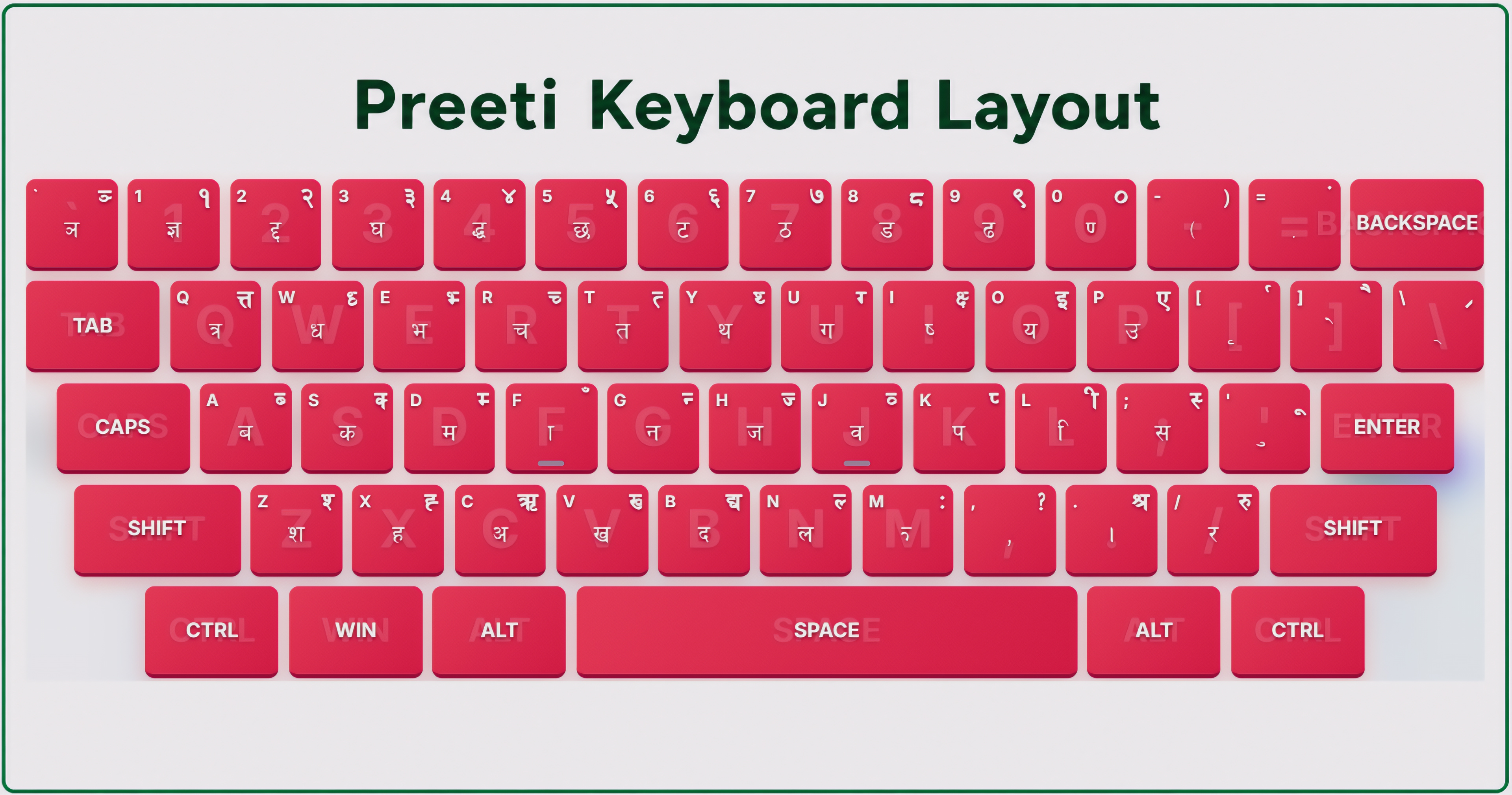
You learn Preeti through keyboard position and muscle memory.
Traditional Preeti charts and open-source conversion maps consistently document the core mapping used below.
Preeti Vowels — स्वर वर्ण
| Nepali Character | Preeti Keys |
|---|---|
| अ | c |
| आ | cf |
| इ | O |
| ई | O{ |
| उ | p |
| ऊ | pm |
| ऋ | C |
| ए | P |
| ऐ | P] |
| ओ | cf] |
| औ | cf} |
| अं | c+ |
| अः | cM |
Notice that several Nepali letters require more than one keystroke.
For example:
c → अ
Adding f:
cf → आ
Similarly:
p → उ
but:
pm → ऊ
This is why memorizing a simple “one English key = one Nepali letter” chart is not enough to master Preeti.
Preeti Consonants — व्यञ्जन वर्ण
| Nepali | Preeti Key / Sequence |
|---|---|
| क | s |
| ख | v |
| ग | u |
| घ | 3 |
| ङ | Alt + 0170 |
| च | r |
| छ | 5 |
| ज | h |
| झ | em or legacy special glyph |
| ञ | ` `` |
| ट | 6 |
| ठ | 7 |
| ड | 8 |
| ढ | 9 |
| ण | 0f |
| त | t |
| थ | y |
| द | b |
| ध | w |
| न | g |
| प | k |
| फ | km |
| ब | a |
| भ | e |
| म | d |
| य | o |
| र | / |
| ल | n |
| व | j |
| श | z |
| ष | if |
| स | ; |
| ह | x |
| क्ष | If |
| त्र | q |
| ज्ञ | 1 |
| श्र | > |
These mappings are one reason a structured learning system is much easier than trying to memorize the entire keyboard from a static image.
Half Letters in Preeti
Several uppercase keys directly represent half forms.
Common examples include:
| Key | Typical Unicode Interpretation |
|---|---|
S | क् |
V | ख् |
U | ग् |
R | च् |
T | त् |
Y | थ् |
W | ध् |
G | न् |
K | प् |
A | ब् |
E | भ् |
D | म् |
H | ज् |
N | ल् |
J | व् |
Z | श् |
X | ह् |
Preeti also provides the explicit halant/virama through:
\ → ्
Therefore, complex combinations may be produced either from dedicated legacy glyphs or through sequences involving half characters.
Complete Matra Reference
Using क as the base character makes the Preeti matra system easier to remember.
| Result | Preeti |
|---|---|
| क | s |
| का | sf |
| कि | ls |
| की | sL |
| कु | s' |
| कू | s" |
| कृ | s[ |
| के | s] |
| कै | s} |
| को | sf] |
| कौ | sf} |
| कं | s+ |
| कः | sM |
| कँ | sF |
The mapping is also documented in legacy Preeti reference sheets.
The Most Important Preeti Rule: Short “ि”
Beginners frequently make mistakes with the short-i matra ि.
In Preeti:
l represents the short-i glyph.
Because ि visually appears before its consonant, the legacy keystroke is entered before the consonant.
So:
कि → ls
not:
sl
This becomes even more important with combined consonants.
Modern Unicode stores the logical character sequence differently and lets the rendering engine position the matra. This is one reason converting Preeti into Unicode requires more than simple character replacement; converters also need contextual reordering rules. Open-source Preeti conversion mappings explicitly contain rules for repositioning ि and other contextual forms.
Context-Sensitive m in Preeti
Another unusual part of Preeti is the role of m.
It behaves as a modifier in several familiar combinations.
Examples include:
| Result | Preeti |
|---|---|
| ऊ | pm |
| फ | km |
| झ | em |
| क्र | qm |
| क्त | Qm |
This is another reason a Preeti-to-Unicode converter cannot simply replace every individual character independently.
It must understand combinations.
Nepali Numbers in Preeti
The number row has one of the most memorable Preeti conventions.
The Shift + number symbols produce Nepali numerals.
| Nepali Number | Key |
|---|---|
| १ | Shift + 1 → ! |
| २ | Shift + 2 → @ |
| ३ | Shift + 3 → # |
| ४ | Shift + 4 → $ |
| ५ | Shift + 5 → % |
| ६ | Shift + 6 → ^ |
| ७ | Shift + 7 → & |
| ८ | Shift + 8 → * |
| ९ | Shift + 9 → ( |
| ० | Shift + 0 → ) |
The normal number keys themselves are used by Preeti for letters or conjuncts such as ज्ञ, द्द, घ, द्ध, छ, ट, ठ, ड, ढ and ण्.
Important Preeti Symbol Keys
| Function | Preeti Input | |
|---|---|---|
Halant / Virama ् | \ | |
Anusvara ं | + | |
Chandrabindu ँ | F | |
Visarga ः | M | |
ऋ matra ृ | [ | |
E matra े | ] | |
Ai matra ै | } | |
Purna Viram । | . | |
Rakar / ्र form | ` | ` |
| रु | ? | |
| रू | Alt + 0191 |
The full FOSS mapping confirms these core relationships.
What Are Preeti Alt Codes?
The normal keyboard does not have enough convenient positions for every legacy glyph required by Nepali writing.
Preeti therefore uses additional characters from extended Windows character positions.
For example:
Alt + 0170
inserts the legacy character ª.
With Preeti selected, that slot is used for the Nepali glyph associated with ङ.
Likewise:
Alt + 0231
inserts ç, which Preeti uses for:
ॐ
This is why Preeti Alt-code charts appear to contain strange symbols such as:
ª, Ë, Í, Î, ß, å, ç
Without Preeti those are simply ordinary legacy Western characters.
With Preeti applied, their glyphs change.
How to Enter a Preeti Alt Code Correctly on Windows
Windows' Alt-code mechanism works through the numeric keypad.
Microsoft's instructions are:
- Turn on Num Lock when required.
- Hold the
Altkey. - Enter the four-digit number using the numeric keypad.
- Release
Alt.
For example:
Hold Alt → type 0 2 3 1 → release Alt.
Microsoft specifically notes that the ordinary number row across the top of the keyboard does not work for this method.
What about laptops without a number pad?
Some laptops provide an embedded numeric keypad through Fn or Num Lock.
If yours does not, Windows Character Map or an external numeric keypad may be necessary. Dell's current Windows guidance similarly notes that laptops without an integrated or dedicated number pad may need Character Map or an external keypad.
When preparing for an actual computer typing test, practice using the same kind of keyboard you expect to encounter.
Complete Preeti Alt Code Master Table
Legacy Preeti reference sheets consistently list the following extended characters.
The Raw Slot column shows the actual Windows character produced before the Preeti font renders it.
The final column shows the common interpretation found in widely used FOSS Preeti conversion mappings where a reliable mapping is available.
| Alt Code | Raw Slot | Common Preeti / Unicode Interpretation |
|---|---|---|
Alt + 0132 | „ „ | ध्र |
Alt + 0133 | … … | opening single quotation form |
Alt + 0136 | ˆ ˆ | फ् |
Alt + 0137 | ‰ ‰ | झ् |
Alt + 0139 | ‹ ‹ | ङ्घ |
Alt + 0145 | ‘ ‘ | ॅ / rare vowel-sign form |
Alt + 0149 | • • | ड्ड |
Alt + 0150 | – – | en dash / legacy punctuation |
Alt + 0151 | — — | em dash / legacy punctuation |
Alt + 0152 | ˜ ˜ | ऽ |
Alt + 0155 | › › | द्र |
Alt + 0160 | NBSP | blank / non-breaking-space slot |
Alt + 0161 | ¡ ¡ | ज्ञ् |
Alt + 0162 | ¢ ¢ | द्घ in widely used FOSS mapping* |
Alt + 0163 | £ £ | घ् |
Alt + 0165 | ¥ ¥ | र् / special half-ra form |
Alt + 0167 | § § | ट्ट |
Alt + 0170 | ª ª | ङ |
Alt + 0171 | « « | ्र |
Alt + 0176 | ° ° | ङ्ढ |
Alt + 0177 | ± ± | + |
Alt + 0180 | ´ ´ | झ |
Alt + 0182 | ¶ ¶ | ठ्ठ |
Alt + 0191 | ¿ ¿ | रू |
Alt + 0197 | Å Å | हृ |
Alt + 0198 | Æ Æ | closing double quotation form |
Alt + 0203 | Ë Ë | ङ्ग |
Alt + 0204 | Ì Ì | न्न |
Alt + 0205 | Í Í | ङ्क |
Alt + 0206 | Î Î | ङ्ख |
Alt + 0210 | Ò Ò | rare legacy typographic slot |
Alt + 0214 | Ö Ö | = |
Alt + 0216 | Ø Ø | ्य |
Alt + 0217 | Ù Ù | ; |
Alt + 0218 | Ú Ú | closing single quotation form |
Alt + 0219 | Û Û | ! |
Alt + 0220 | Ü Ü | % |
Alt + 0221 | Ý Ý | ट्ठ |
Alt + 0222 | Þ Þ | rare/font-specific legacy slot** |
Alt + 0223 | ß ß | द्म |
Alt + 0229 | å å | द्व |
Alt + 0230 | æ æ | opening double quotation form |
Alt + 0231 | ç ç | ॐ |
Alt + 0247 | ÷ ÷ | / |
Important note about conflicting Alt-code charts
Preeti has been copied, converted, redistributed and documented by many organizations for more than three decades.
As a result, old internet charts occasionally disagree.
One example is Alt + 0162: a widely used FOSS Preeti mapping interprets its raw ¢ slot as द्घ, while some older Nepali articles label the same code differently. Similarly, some old charts list Alt + 0222 without a clearly documented modern Unicode equivalent.
For that reason, professional software should test mappings against the exact Preeti font file and encoding implementation it supports, rather than blindly copying one old JPEG chart.
This is especially important for NepalType's Alt-code dictionary.
The Most Useful Alt Codes to Memorize First
You do not need to memorize every rare extended slot on your first day.
Start with characters that regularly appear in real Nepali words:
Alt + 0170 → ङ
Useful in words containing ङ.
Alt + 0167 → ट्ट
Useful for ट्ट combinations.
Alt + 0176 → ङ्ढ
A special conjunct.
Alt + 0182 → ठ्ठ
Another conjunct difficult to obtain from ordinary keys.
Alt + 0191 → रू
Useful for the long रू form.
Alt + 0197 → हृ
Useful in words such as हृदय.
Alt + 0203 → ङ्ग
Extremely useful in words such as अङ्ग.
Alt + 0204 → न्न
Used in many combined forms.
Alt + 0205 → ङ्क
Useful in words such as अङ्क.
Alt + 0206 → ङ्ख
Useful for ङ्ख combinations.
Alt + 0221 → ट्ठ
Alt + 0223 → द्म
Alt + 0229 → द्व
Useful in words such as द्वार and द्वन्द्व.
Alt + 0231 → ॐ
The Om symbol.
Do not simply stare at these numbers.
The fastest way to remember Alt codes is to practise them inside actual words and sentences.
Why Alt Codes Sometimes Do Not Work
If a Preeti Alt code is not working, check these issues.
You are using the top number row
Windows Alt codes normally require the numeric keypad.
Num Lock is off
Enable Num Lock if your keyboard requires it.
Preeti is not selected as the font
The inserted character may actually be correct but appear as:
ª
or:
Ë
because the application is displaying it with Arial, Calibri or another font.
Select the character and apply Preeti.
Your application intercepts the keyboard shortcut
Some browser-based editors, operating systems, remote desktops or applications handle Alt combinations differently.
Your laptop has no real numeric keypad
Use an embedded number pad, Character Map, an external keypad, or a dedicated Preeti typing environment.
You are expecting Unicode output
Remember: classic Windows Alt codes insert legacy character positions.
They do not magically create Unicode Nepali.
How to Install Preeti Font on Windows
If you have obtained a legitimate and trusted .ttf or .otf copy of Preeti:
- Extract the downloaded ZIP file if necessary.
- Locate the font file.
- Right-click the font.
- Choose Install.
- Or choose Install for all users if appropriate.
- Restart Microsoft Word or another application if Preeti does not immediately appear.
Microsoft officially documents this same Windows font-installation process for TrueType and OpenType files.
Security tip
Fonts are files installed into your operating system.
Avoid downloading random “Preeti setup.exe” packages from unknown websites.
A genuine font normally does not need an unrelated executable installer.
Use a trustworthy .ttf or .otf source and scan downloaded files when necessary.
Installing Preeti on macOS
Modern macOS supports TrueType and OpenType fonts.
Apple recommends installing fonts using Font Book.
You can generally:
- Double-click the font file in Finder.
- Choose Install in Font Book.
Font Book also validates downloaded fonts and can warn about damaged or duplicate files.
However, remember that traditional Windows decimal Alt-code entry is a Windows input behavior.
Installing Preeti on a Mac does not automatically reproduce every Windows Alt-code workflow.
How to Type Preeti in Microsoft Word
For a traditional offline Preeti workflow:
- Install Preeti.
- Open Microsoft Word.
- Select Preeti from the font menu.
- Start typing using the Preeti keyboard mapping.
- Use the required legacy Alt codes for extended glyphs.
- Save the document with the font information preserved where possible.
- Before sending the document to another computer, verify that the receiving computer has Preeti installed.
If the recipient does not have Preeti, the text may appear as combinations of English characters and symbols.
For final print distribution, exporting an approved document to PDF can often preserve its visual appearance better than sending an editable legacy-font document.
Keep the editable original as well.
How to Practice Preeti Without Installing the Font
Modern web applications can simulate the Preeti typing environment directly inside the browser.
On NepalType's Preeti Typing mode, users can currently access dedicated:
- letter lessons;
- word lessons;
- special/Alt-character lessons;
- paragraph lessons;
- free practice;
- live speed measurement;
- accuracy measurement;
- typing time;
- lesson and course progress;
- keyboard mastery tracking;
- streaks;
- rankings and leaderboard features.
The current Preeti interface also contains an Alt-code helper and links to the detailed Alt-code resource.
This allows a learner to focus on actual typing practice rather than spending the first session configuring fonts and software.
A Better Way to Learn Preeti
Do not try to memorize the full keyboard screenshot in one sitting.
Typing skill is muscle memory.
A much better progression is:
Stage 1 — Home-row characters
Practise a small group repeatedly until you can press them without consciously remembering the English key.
Stage 2 — Upper and lower rows
Add only a few new keys at a time.
Stage 3 — Matras
Practise:
का, कि, की, कु, कू, के, कै, को, कौ
with many different consonants.
Stage 4 — Half letters and conjuncts
Move into:
क्त त्र ज्ञ क्ष श्र प्र द्व ङ्क ङ्ग
Stage 5 — Real words
Typing isolated keys trains fingers.
Typing words trains actual language patterns.
Stage 6 — Paragraphs
Once individual letters stop requiring conscious thought, practise continuous Nepali passages.
Stage 7 — Timed practice
Only after your accuracy becomes stable should you aggressively chase WPM.
Accuracy Before Speed
A common mistake is repeatedly taking typing-speed tests while still looking at the keyboard.
That can reinforce bad habits.
If you mistype the same key hundreds of times at high speed, you are training your fingers to make the wrong movement faster.
A better progression is:
Correct key → correct finger → correct rhythm → consistency → speed.
During early practice, an accuracy target above roughly 95% is more useful than trying to produce an impressive WPM number with constant errors.
Once your keyboard movement becomes automatic, speed normally rises naturally.
Do Not Look at the Keyboard
A visual keyboard is useful during learning, but your goal should not be permanent dependence on it.
At first:
Eyes: screen + occasional keyboard guide.
Later:
Eyes: almost entirely on the text.
Eventually, seeing the Nepali letter should trigger the corresponding finger movement automatically.
That transition is the difference between knowing a keyboard layout and actually being able to type professionally.
Why Preeti Text Turns Into Strange English Characters
Suppose somebody sends you a Word file and you see something like:
g]kfn
instead of:
नेपाल
The document may not be corrupted.
The underlying legacy Preeti characters may still be intact.
Your computer simply may not be displaying them using Preeti.
Try selecting the affected text and changing its font to Preeti.
If the correct Nepali text appears, you have identified a legacy-font document.
If your goal is to publish the content online, however, merely applying Preeti is not enough.
You should normally convert the text into Unicode.
Why Changing Preeti to a Unicode Font Does Not Convert It
This is extremely important.
Suppose:
g]kfn
looks like नेपाल when displayed in Preeti.
Changing its font dropdown from Preeti to a Unicode Devanagari font does not convert those stored letters into नेपाल.
The underlying characters are still:
g ] k f n
You changed only their appearance.
Real conversion requires a mapping algorithm that transforms the stored legacy sequence into actual Unicode Devanagari characters.
How Preeti-to-Unicode Conversion Works
A proper converter performs several stages.
Character mapping
Legacy Preeti slots are mapped to corresponding Unicode Devanagari characters.
For example, ordinary keys include mappings similar to:
s → क
g → न
k → प
/ → र
Combination processing
Some sequences do not translate one character at a time.
For example, the contextual m behavior produces combinations such as:
pm → ऊ
km → फ
Matra reordering
The legacy short-i representation may appear before its consonant in the Preeti source.
Unicode conversion needs to place the vowel sign into the correct logical sequence.
Reph and conjunct handling
Legacy glyph-based forms need to be transformed into proper Unicode character sequences.
Cleanup
Duplicate matras, special forms and legacy punctuation may need normalization.
Open-source converters based on FOSS Nepal mappings contain explicit post-processing rules for these transformations.
This is why a high-quality Preeti converter is much more than a find and replace table.
Preeti to Unicode Example
Consider the legacy Preeti text:
g]kfn
A Preeti-aware converter interprets the sequence as:
नेपाल
The visual result may look identical to a user when the correct fonts are applied.
Technically, however, they are completely different.
The Unicode result is now actual Devanagari text.
That means it can be searched, indexed, processed and displayed using ordinary Unicode-compatible Nepali fonts.
When Should You Convert Preeti to Unicode?
Convert Preeti to Unicode when the text is going to be used for:
- websites;
- blogs;
- search engines;
- online forms;
- databases;
- mobile applications;
- searchable archives;
- social media;
- email;
- modern document systems;
- APIs;
- machine translation;
- text analysis;
- accessibility systems;
- AI and NLP processing.
Keep Preeti when you specifically need compatibility with an existing Preeti-based workflow or legacy template.
In many professional situations, the safest archival strategy is:
preserve the original + create a Unicode copy.
Do not destroy the only original legacy document after automated conversion.
Converting Preeti on NepalType
NepalType includes a dedicated converter for:
Preeti → Unicode
and:
Unicode → Preeti
The converter is designed specifically for Nepali legacy/modern font workflows rather than simple visual font switching.
Why Preeti Should Not Be Used as the Main Encoding of a Modern Website
A web page needs semantic text, not just the appearance of text.
If a page visually shows Nepali because a custom legacy font turns Latin letters into Devanagari-looking shapes, the browser still fundamentally contains Latin/legacy character values.
That creates problems for:
Search
A person searching Google for नेपाल may not match legacy text stored as g]kfn.
Copy and paste
Users may copy beautiful-looking Nepali and paste apparently random English characters somewhere else.
Accessibility
Screen readers and other assistive technologies rely on actual character information.
Search within the page
Searching for a Nepali word may fail.
Databases
The stored text no longer semantically represents the Nepali characters displayed to users.
Mobile compatibility
The experience depends upon a specific legacy font being available or embedded correctly.
For these reasons, the content of this blog article itself should remain Unicode, even though it teaches Preeti.
Use Preeti only for visual demonstrations where necessary.
Preeti and SEO
If you operate a Nepali website, this distinction matters greatly.
Suppose you want Google to understand a page about:
नेपाली टाइपिङ
The page should actually contain those Unicode characters.
It should not contain legacy Preeti data that merely looks like नेपाली टाइपिङ after a custom font is applied.
For an article like this one, naturally include useful search phrases such as:
Preeti font Preeti keyboard layout Preeti typing Preeti typing practice Preeti Alt codes Preeti font keyboard Nepali Preeti font Preeti to Unicode Unicode to Preeti Preeti font in Microsoft Word Nepali typing keyboard Preeti special characters
But do not repeat keywords unnaturally.
A useful article that answers users' questions comprehensively is much better than keyword stuffing.
Opening Old Preeti Documents Safely
If you receive an important legacy document:
First: make a backup
Never modify the only copy.
Second: determine the font
Check whether the document uses Preeti, Kantipur, PCS Nepali or another legacy font.
These formats are not interchangeable merely because they all display Nepali.
Third: install the correct font if necessary
This lets you verify what the original document was supposed to look like.
Fourth: preserve the visual original
For important legal, historical or administrative documents, keep the original file.
Fifth: create a converted Unicode version
Use a trusted converter.
Sixth: manually review the Unicode output
Pay special attention to:
ङ्क ङ्ख ङ्ग द्व द्ध ट्ट ट्ठ हृ र् forms ि matra quotation marks punctuation numbers
No bulk historical conversion should be accepted blindly without quality checking.
Common Preeti Problems and Their Solutions
I typed Nepali but another computer shows English letters
Cause Preeti is missing or the destination application changed the font.
Solution Install/apply Preeti for legacy display, or convert the document to Unicode for long-term portability.
Copying Preeti into Facebook, a website or email produces garbage
Cause The text is still legacy encoded.
Solution Convert it to Unicode before using it on modern web services.
Alt codes type symbols instead of Nepali
Cause Those symbols are the underlying legacy characters.
Solution Make sure Preeti is applied. For example, an extended character may appear as ª outside Preeti.
Alt codes do nothing
Cause You may be using the top number row rather than the numeric keypad.
Solution Enable Num Lock and use the number pad.
The ि matra goes to the wrong place
Cause Preeti uses legacy visual-order behavior.
Solution Practise combinations such as ls → कि until the ordering becomes automatic.
Some converted conjuncts are incorrect
Cause The source may not actually be Preeti, may contain mixed fonts, or may use a different Preeti variant.
Solution Identify the source font first and manually review uncommon conjuncts after conversion.
Changing the Word font does not convert my document
Cause Font switching and encoding conversion are different operations.
Solution Use a real Preeti-to-Unicode converter.
Preeti Font and Mobile Phones
Typing traditional Preeti directly on phones is less practical because Preeti was designed around desktop-style physical keyboard mappings and legacy font behavior.
For mobile communication and modern applications, Unicode Nepali is generally more appropriate.
However, mobile devices can still be useful for:
- reading converted documents;
- accessing online Preeti lessons;
- reviewing keyboard layouts;
- learning Alt codes;
- practising with an external Bluetooth or USB keyboard where supported.
For serious speed development, a full physical keyboard remains preferable because finger positioning and muscle memory are central to touch typing.
Preeti in Printing and Graphic Design
Legacy fonts can still be useful when an existing printing or design workflow depends on them.
Before sending a Preeti project to another computer or print shop:
- confirm the correct font is available;
- inspect all complex characters;
- verify page layout;
- preserve the editable source;
- export an approved PDF when appropriate;
- visually compare the PDF against the editable file.
A visually correct PDF reduces dependence on the recipient having exactly the same editing environment.
For new digital-first content, Unicode is normally easier to maintain.
Preeti for Data Entry and Archives
Organizations with thousands of old Preeti documents should think about migration carefully.
A professional migration process can include:
Inventory → Font Detection → Backup → Conversion → Validation → Unicode Archive
Do not simply convert everything and delete the source.
Legacy documents may contain:
- several fonts in one file;
- English text mixed with Nepali;
- manually positioned characters;
- tables;
- headers and footers;
- uncommon ligatures;
- malformed legacy sequences;
- font-specific symbols.
Modern open-source tools demonstrate that automated conversion of Preeti and other Nepali legacy fonts is possible, including within document-processing workflows, but contextual mappings and document formatting still require careful handling.
Why Some Preeti Converters Give Different Results
Two converters can disagree because:
- their mapping dictionaries differ;
- one supports more extended characters;
- one handles reph correctly and another does not;
- one reorders
िcorrectly; - punctuation mapping differs;
- one assumes Preeti while the source is actually Kantipur or another font;
- the source contains mixed English and Nepali;
- different copies of a legacy font contain differences;
- post-processing rules differ.
Therefore, “100% conversion” should always be understood in relation to the source document and mapping.
For important documents, proofread the result.
Preeti Keyboard Practice Strategy for Beginners
A productive learning session can look like this:
0–5 minutes
Warm up on familiar letters.
5–15 minutes
Practise one keyboard row.
15–25 minutes
Practise real Nepali words containing those keys.
25–35 minutes
Practise matras and half letters.
35–45 minutes
Type a paragraph without looking at your hands.
Final few minutes
Review the keys that caused the most mistakes.
Your practice should gradually shift from:
letters → combinations → words → sentences → paragraphs → timed tests.
That progression produces much stronger muscle memory than repeatedly typing random letters forever.
How to Improve Preeti Typing Speed
Once you understand the keyboard, focus on rhythm.
Good typists do not consciously think:
“Where is क?”
then:
“Where is म?”
then:
“Where is र?”
The visual word begins triggering an automatic movement pattern.
To reach that stage:
- use the correct finger for each key;
- keep your hands near the home row;
- stop looking down repeatedly;
- practise difficult combinations more often than easy ones;
- maintain accuracy;
- type real Nepali text;
- practise consistently;
- use timed tests only after basic accuracy develops;
- analyse which keys repeatedly cause errors.
A practice platform that records accuracy by key can be more useful than one that shows only WPM.
Preeti vs “Traditional Unicode” Is Not the Same Thing
This is another important distinction.
A Traditional Unicode keyboard may intentionally place many Nepali characters on positions familiar to users of traditional legacy fonts.
The Language Technology Kendra describes Traditional Unicode as a layout designed to be familiar to users of TrueType fonts such as Preeti and Kantipur.
However:
similar keyboard positions do not mean identical technology.
Preeti:
legacy glyph mapping
Traditional Unicode:
actual Unicode Devanagari input
A skilled Preeti typist may therefore find Traditional Unicode easier to learn than someone starting from zero, but the resulting text is technically different.
Can Preeti Be Converted Back From Unicode?
Yes.
Conversion can work in both directions:
Preeti → Unicode
and:
Unicode → Preeti
However, Unicode contains a much richer standardized representation of Devanagari.
Converting Unicode back into an old legacy font sometimes requires choosing particular legacy glyph combinations.
Therefore, always inspect complex output before using it in an important document.
Should New Users Still Learn Preeti?
That depends on the goal.
Learn Preeti if you expect to work with:
- legacy Nepali documents;
- offices that specifically use Preeti;
- old templates;
- traditional data-entry environments;
- printing workflows requiring it;
- an examination or practical environment that specifically provides it.
Learn Unicode as well if you work with:
- websites;
- modern software;
- online publishing;
- databases;
- social media;
- mobile devices;
- searchable documents.
These are complementary skills.
Understanding Preeti also gives you valuable knowledge for rescuing and converting Nepal's huge collection of older digital documents.
Frequently Asked Questions About Preeti Font
What is Preeti Font?
Preeti is a legacy Nepali font that uses Latin and extended character positions to display Nepali Devanagari glyphs.
Is Preeti Unicode?
No.
Preeti is a non-Unicode legacy font.
When was Preeti created?
Technical analyses of commonly distributed copies date Preeti to 1993.
Who created Preeti Font?
The commonly cited technical attribution is Ajay Mishra, who reportedly named it after his daughter Preeti.
What is the Preeti key for क?
S? No—the normal lowercase key is:
s → क
Uppercase:
S → क्
What is the Preeti key for नेपाल?
A commonly used legacy representation is:
g]kfn
which converts to:
नेपाल.
What is the Preeti key for ङ?
Use:
Alt + 0170
The underlying extended character is ª.
What is the Alt code for ॐ in Preeti?
Alt + 0231
The underlying legacy character is ç.
What is the Alt code for ङ्ग?
Alt + 0203
The underlying legacy slot is Ë.
What is the Alt code for ङ्क?
Alt + 0205
The underlying legacy slot is Í.
What is the Alt code for ङ्ख?
Alt + 0206
The underlying legacy slot is Î.
What is the Alt code for द्व?
In the widely used FOSS Preeti mapping:
Alt + 0229 → legacy å → द्व.
What is the Alt code for हृ?
Alt + 0197 → Å → हृ
What is the Alt code for द्म?
Alt + 0223 → ß → द्म
How do I type कि in Preeti?
Use:
ls
The short-i glyph is entered before the consonant in the legacy sequence.
How do I type की?
Use:
sL
How do I type कु?
Use:
s'
How do I type कू?
Use:
s"
How do I type के?
Use:
s]
How do I type कै?
Use:
s}
How do I type को?
Use:
sf]
How do I type कौ?
Use:
sf}
Why does my Preeti text look like English?
Because Preeti stores legacy Latin/extended character positions and relies on the Preeti font to make them appear as Nepali.
Either apply Preeti or convert the text to Unicode.
Can Google properly read Preeti text as Nepali?
Legacy Preeti text should not be used as the semantic text encoding of a modern website.
Convert it to Unicode so the actual Nepali Devanagari characters exist in the page.
Can I copy Preeti directly into a website?
You technically can copy the underlying legacy characters, but they may not display or behave as intended elsewhere.
For web publishing, convert the content to Unicode first.
Can I use Preeti in Microsoft Word?
Yes, after installing a compatible Preeti font file and selecting it from the font menu.
Why aren't my Alt codes working?
Use the numeric keypad rather than the top number row, and make sure Num Lock is enabled where necessary.
Is Preeti required for Lok Sewa?
Do not assume this universally.
The current PSC syllabus referenced for Nayab Subba specifies Devanagari Typing, but that syllabus section does not name Preeti. Always follow the exact current advertisement, syllabus and examination instructions.
Where can I practise Preeti online?
NepalType provides a dedicated Preeti practice mode with letter, word, special-character and paragraph lessons along with speed, accuracy and progress tracking.
Use NepalType: /preeti
Where can I convert Preeti to Unicode?
Use NepalType's Nepali Font Converter.
Use NepalType: /converter
Preeti Cheat Sheet
For quick reference:
| Need | Input |
|---|---|
| क | s |
| ख | v |
| ग | u |
| घ | 3 |
| ङ | Alt + 0170 |
| च | r |
| छ | 5 |
| ज | h |
| ञ | ` `` |
| त | t |
| थ | y |
| द | b |
| ध | w |
| न | g |
| प | k |
| फ | km |
| ब | a |
| भ | e |
| म | d |
| य | o |
| र | / |
| ल | n |
| व | j |
| श | z |
| स | ; |
| ह | x |
| त्र | q |
| ज्ञ | 1 |
| श्र | > |
् | \ |
ं | + |
ँ | F |
ः | M |
। | . |
ृ | [ |
े | ] |
ै | } |
रु | ? |
रू | Alt + 0191 |
ॐ | Alt + 0231 |
Final Advice for Learning Preeti
Preeti can initially look difficult because its keyboard is not phonetic, several characters depend on Shift, some combinations are contextual, and advanced glyphs require legacy Alt codes.
But experienced typists are not remembering dozens of codes every second.
They have built muscle memory.
Start slowly.
Learn the keyboard systematically.
Understand matras before chasing speed.
Practise difficult combinations inside real words.
Learn the most useful Alt codes before rare ones.
Keep accuracy high.
Then move into paragraphs and timed tests.
Most importantly, understand what Preeti actually is.
It is not simply another modern Nepali keyboard.
It is an important legacy font system that helped make Nepali digital publishing possible long before today's Unicode environment—and understanding it remains valuable for typing, office work, historical documents, data conversion and preservation.
Ready to practise?
Go to NepalType → Preeti Typing and begin with the letter lessons before progressing through words, special Alt characters and paragraphs.
Use NepalType: /preeti
Already have an old Preeti document?
Use NepalType → Font Converter to convert it between Preeti and Unicode.
Use NepalType: /converter
Need a dedicated Alt-code reference while practising?
Open the existing Preeti Alt Code Guide.
Use NepalType: /blogs/alt-codes-guide