
Romanized Unicode on Nepal TYPE is a real practice mode with a defined English-keyboard-to-Devanagari mapping. It produces Unicode Nepali characters; it is not a free-form Roman Nepali converter.
What Is Romanized Unicode Typing?
Romanized Unicode is a Nepali input layout designed around familiar QWERTY associations. Nepal TYPE offers it as the Romanized mode at /romanized. Pressing a key produces the layout's assigned Devanagari character, so the result is real Unicode text such as नेपाली.
Several memorable pairs follow a sound-like pattern: k gives क and K gives ख; g gives ग and G gives घ. But it remains a fixed layout, so learners should use the Nepal TYPE keyboard and keymap as the source of truth.
mero naam into Nepali text.Roman Nepali Is Not the Same Thing
Casual Roman Nepali
You might write kaha chau? or mero naam. These remain Latin letters and spelling varies between people.
Nepal TYPE Romanized Unicode
You press keys from a defined map. The output is stored as Devanagari Unicode, which can be copied and used where Unicode Nepali is supported.
This distinction matters because a layout is predictable only when you learn its actual key assignments. Do not assume common chat spellings such as xa are commands in this keyboard.
Romanized Keyboard Layout
The keyboard image below is the layout reference supplied for this guide. The tables list the actual mappings implemented in Nepal TYPE's Romanized mode.
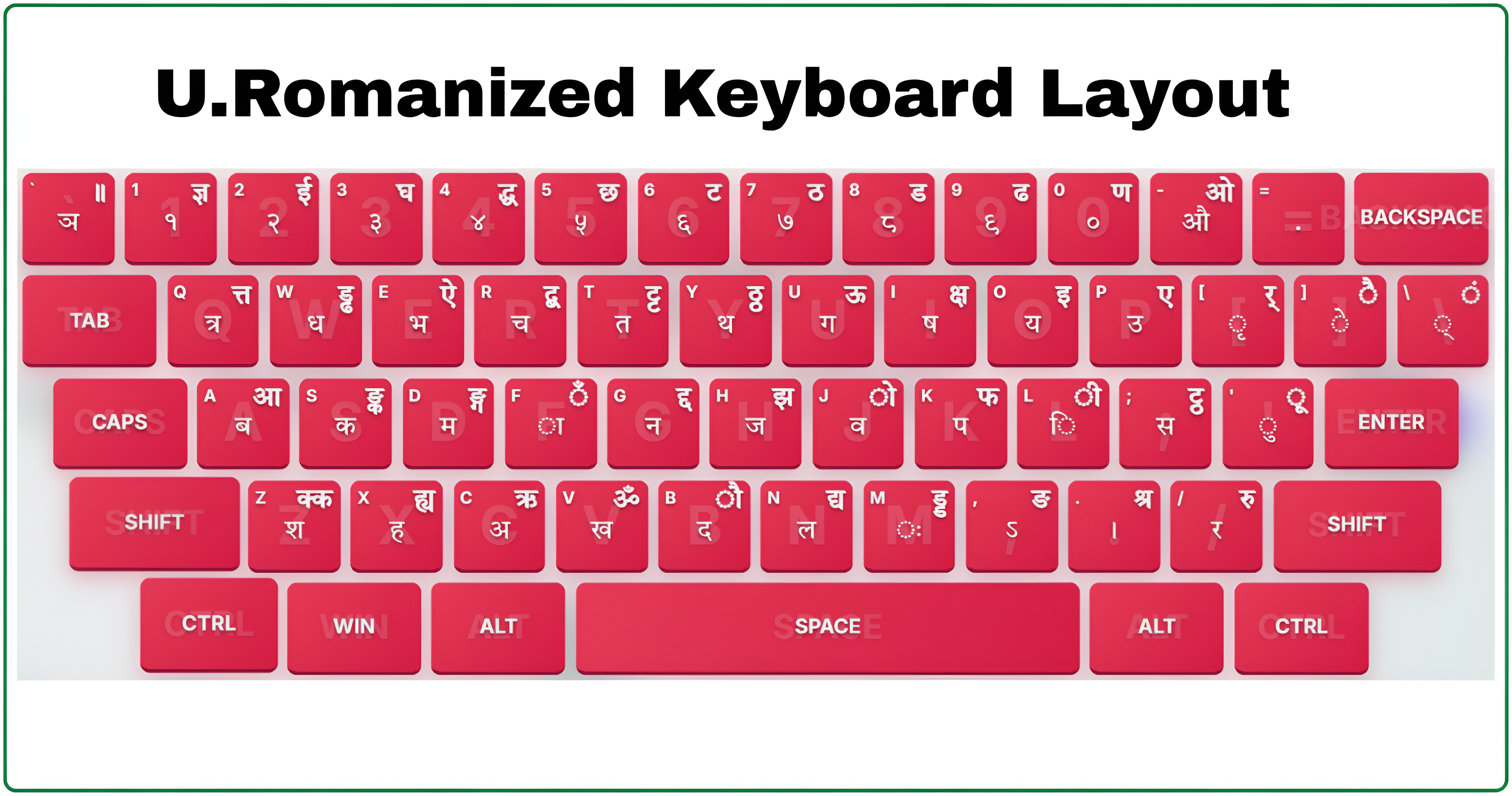
| Key | Output | Shift + key | Output |
|---|---|---|---|
k | क | K | ख |
g | ग | G | घ |
c | च | C | छ |
j | ज | J | झ |
t | त | T | थ |
d | द | D | ध |
p | प | P | फ |
b | ब | B | भ |
s | स | S | श |
n | न | N | ण |
Other useful assignments include r for र, y for य, l for ल, v for व, h for ह, and . for the Nepali danda ।.
Matras, Halant, and Combinations
Unicode represents a consonant first, then adds vowel signs or a halant. The rendering system handles the final visual form. For example, the vowel sign ि may look left of a consonant, but it is logically attached after that consonant.
| Key | Output | Use |
|---|---|---|
a | ा | Long-a matra |
i | ि | Short-i matra |
I | ी | Long-i matra |
u | ु | Short-u matra |
U | ू | Long-u matra |
e | े | E matra |
o | ो | O matra |
/ | ् | Halant / virama for half letters |
For conjuncts, type the logical sequence. For example, क्त is क + ् + त; त्र is त + ् + र. The exact keystrokes come from the map, so use the live keyboard when practising unfamiliar combinations.
Romanized, Traditional Unicode, and Preeti
Romanized Unicode
Best fit if you know QWERTY and want a defined layout with sound-like associations. Nepal TYPE offers dedicated practice for it.
Traditional Unicode
Also produces Unicode Nepali, but uses a different established key layout. Choose it when that layout matches your training or requirement.
Preeti
A legacy-font workflow that remains relevant for documents and environments that specifically require Preeti.
The important part
Romanized and Traditional modes both produce Unicode text. The difference is the input layout, not the Unicode output standard.
A Practical Nepal TYPE Learning Path
Start in the live Romanized practice mode. Build accuracy before speed and let the on-screen keyboard verify each key family.
- Learn a small consonant family:
k/K,g/G,t/T, andd/D. - Add common letters such as
r,n,m,y, andl. - Practise matras separately before long words.
- Use the halant only after basic letters feel automatic.
- Move to words, sentences, and timed drills while keeping accuracy high.
A useful first set of words is नेपाल, नाम, घर, समय, and नेपाली. The right pace is the one where you can explain why each output appeared.
Unicode, Fonts, and Digital Use
Unicode is the character standard underneath the text. Devanagari characters occupy the Unicode range U+0900 to U+097F; for example, क is U+0915, ि is U+093F, and the Nepali danda । is U+0964.
Unicode is not a font. The keyboard layout decides what you enter, Unicode identifies the stored characters, and a font decides how those characters look. That is why Unicode Nepali is generally better suited to modern documents, search, copy and paste, websites, and applications than text that depends on a particular legacy font mapping.
| When you need Nepali text | Why Unicode helps |
|---|---|
| Word processors and documents | Text can move between modern applications without relying on one legacy font. |
| Web pages and forms | Actual Nepali characters can be stored, searched, and read by compatible software. |
| Messages and captions | You can write Devanagari rather than leaving the content in Roman letters. |
| Names and long text | A fixed layout gives repeatable key behaviour once learned. |
Use Romanized Unicode in the Browser or on Your PC
Free typing in Nepal TYPE
You can type Romanized Unicode on Nepal TYPE without installing a keyboard, font, or desktop application. Open Romanized practice, use the free typing area, then copy the resulting Unicode Nepali text and paste it into a compatible document, form, message, or website.
Typing offline with a PC layout
To type offline in desktop applications, you need an input method or keyboard layout installed in your operating system that matches the Romanized mapping you are learning. A default Nepali keyboard can use a different arrangement, so do not assume it will produce the same characters as Nepal TYPE's Romanized mode.
Nepal TYPE does not currently install a Romanized keyboard on your PC. A detailed article on selecting, enabling, and testing a matching offline layout is in preparation.
Romanized Unicode PC setup guide (Coming soon)Real-Life Romanized Unicode Use
Romanized mode is useful wherever a modern service accepts Nepali Unicode. A student can prepare a Nepali assignment or presentation; an everyday user can enter a name or address; a content creator can write a caption, title, or comment; and a writer can prepare email or website copy in Devanagari.
Students
Practise words and sentences before using the layout for assignments, notes, slides, or reports.
Everyday tasks
Use it for supported forms, searches, messages, and documents that need actual Nepali characters.
Content creation
It supports natural mixed-language writing such as आज online class छ।
Formal writing
The layout does not decide whether language is casual or formal; your word choice does.
Compatibility still belongs to the receiving service. Nepal TYPE can produce and practise Unicode output, but a particular office form or legacy workflow may require a different layout or format. Check that requirement before committing to a mode.
Common Mistakes to Avoid
Expecting a spelling prediction engine
Typing namaste into a transliteration tool may produce a suggestion. Romanized mode on Nepal TYPE instead follows its defined key map. Learn the assigned keys and Shift states.
Treating uppercase as an English capital
In this layout, K is not a capital version of k; it produces a different Nepali character. Accuracy with pairs such as क/ख, ग/घ, त/थ, द/ध, प/फ, and ब/भ should come before speed.
Typing visual order instead of logical order
For कि, enter the base consonant then the ि vowel sign. For conjuncts, use the halant between consonants. Unicode shaping handles the final display.
Assuming every Roman Nepali spelling is a keyboard command
Chat spellings vary. A fixed input layout is more disciplined: physical key plus optional Shift state produces a known character.
A 20-Minute Practice Routine
| Time | Focus | Goal |
|---|---|---|
| 5 minutes | Easy consonants | Build confidence with familiar sound associations. |
| 5 minutes | Shift pairs | Separate unaspirated and aspirated consonants accurately. |
| 3 minutes | Matras | Attach vowel signs to base characters in logical order. |
| 3 minutes | Halant and combinations | Build half letters and common conjuncts slowly. |
| 4 minutes | Words and sentences | Turn key knowledge into controlled rhythm. |
Move to timed practice only when errors are understandable. A good progression is letters, then words, then matras and combinations, then sentences, paragraphs, and finally speed work.
Frequently Asked Questions
Is Romanized Unicode real Unicode?
Yes. Nepal TYPE's Romanized mode maps keystrokes to Devanagari Unicode characters. The keyboard layout differs from Traditional Unicode, not the character standard.
Does Romanized mode automatically transliterate a full English spelling?
No. It is a fixed keymap. The app's keyboard and practice mode show the implemented mappings, so use those rather than assuming a chat-style spelling rule.
Can I use the result in documents or websites?
Unicode text is designed for modern software and the web. Whether a particular form or workflow accepts Nepali Unicode depends on that service's requirements.
Which mode should I learn?
Choose Romanized when its QWERTY-oriented map feels natural. Choose Traditional Unicode or Preeti when your class, workplace, examination, or existing muscle memory requires those layouts.
Can I type संयुक्त अक्षर?
Yes. Use the logical character sequence with the halant, for example क + ् + ष for क्ष and त + ् + र for त्र.
Is Romanized Unicode only for chatting?
No. The output is Unicode text, so it can be used in compatible modern documents, websites, messages, and applications. The receiving service decides what it accepts.
Why does ि appear before the consonant?
It is rendered on the left, but logically follows the consonant in Unicode. Type the base consonant first, then the vowel sign.