
Traditional Unicode is a practical way to type real, portable Nepali text. This guide explains the keyboard logic, character order, matras, conjuncts, shortcuts, practice methods, and the difference between Traditional Unicode and Standard Traditional.
Unicode Is Not a Font
Unicode is a universal character standard. It assigns each Nepali character a stable number, called a code point, so the same text can be stored, searched, copied, and read across devices. A font only decides how that stored text looks on screen.
For example, क is Unicode U+0915. It remains क whether the reader uses Noto Sans Devanagari, Mangal, Kalimati, or another Unicode-capable font. This is why Unicode text works reliably in websites, databases, social posts, and modern documents.
Unicode stores the actual Nepali characters. A font draws those characters. Changing the font should not turn Unicode Nepali into unrelated Latin letters.
What Is Traditional Unicode?
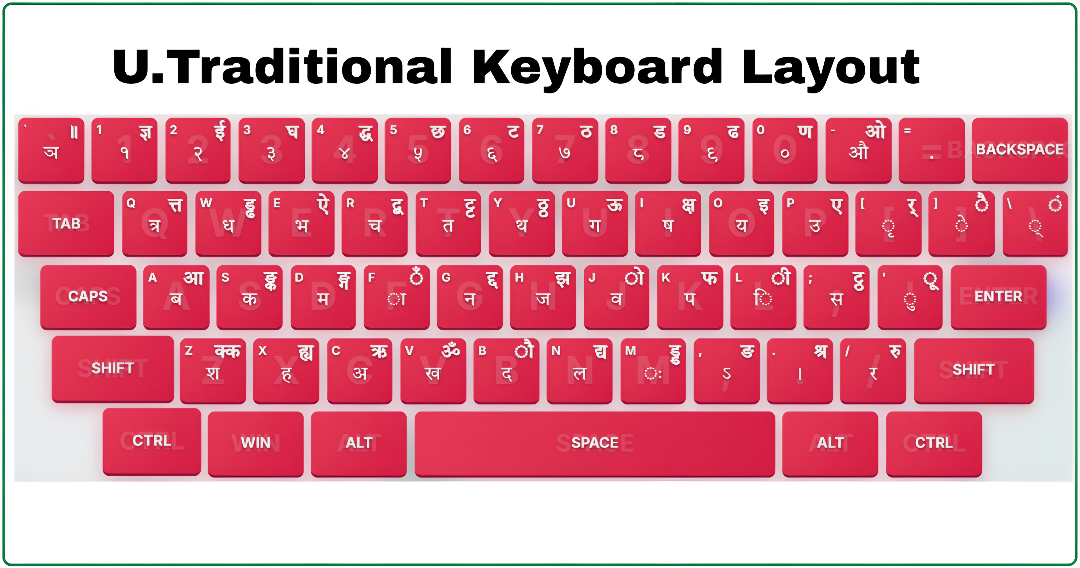
Traditional Unicode is a Nepali keyboard approach based on familiar traditional key positions while producing standard Unicode Devanagari text. It is not a legacy font encoding and it does not require Preeti Alt codes. The goal is practical: experienced Nepali typists can use a position-based keyboard and still create text that works everywhere.
The layout is especially useful for users coming from institutional typing practice, offices, publishing workflows, and competitive-exam preparation. It rewards muscle memory, but the output stays modern and searchable.
Why it matters
Portable text
Copy it into Word, Excel, web forms, email, and social platforms without relying on one installed legacy font.
Real Nepali characters
Each letter is stored as Devanagari, not as an English key that merely looks Nepali under a particular font.
Keyboard continuity
Traditional positions give many learners a familiar route into Unicode typing.
Search and SEO
Browsers and search engines can understand and index the Nepali words themselves.
Traditional Unicode vs Preeti
Preeti is a legacy font system. A file may visually show नेपाली while the underlying stored characters are Latin letters or symbols. Traditional Unicode instead stores the Devanagari characters directly. Both can use position-based keyboard learning, but their output and long-term compatibility are fundamentally different.
| Topic | Traditional Unicode | Preeti |
|---|---|---|
| What is stored | Actual Devanagari Unicode characters | Legacy Latin/symbol character positions |
| Works without a specific font | Yes, with a Unicode Devanagari font available | No, it needs the matching legacy font |
| Search and copy/paste | Reliable across current platforms | Often needs conversion first |
| Complex letters | Built through normal character sequences | May use special font mappings or Alt codes |
If you maintain old archives, keep Preeti available and preserve the original font. If you are creating new content for the web or interoperable documents, Traditional Unicode is the safer default.
Traditional Unicode vs Romanized Unicode
Romanized Unicode is phonetic: you type Latin sounds and software chooses Nepali output. Traditional Unicode is positional: you learn where each Devanagari character lives on the keyboard. Romanized typing is fast to start; Traditional Unicode is better for learners who prefer a stable physical map and formal typing practice.
Standard Traditional vs Traditional Unicode
These modes can look similar because both output Unicode Nepali, but they should remain separate in practice. Traditional Unicode preserves a traditional position-oriented experience. Standard Traditional follows its own standardized mapping and may place certain characters, punctuation, or modifier combinations differently.
Do not mix the layouts while building speed. Choose the mode required by your work, exam, or office, then let your fingers learn one consistent map. NepalType keeps them separate so your accuracy statistics and muscle memory stay meaningful.
Choose Traditional Unicode when
You are continuing a traditional position-based workflow and need modern Unicode output.
Choose Standard Traditional when
Your institution, keyboard specification, or practice requirement explicitly asks for that standardized layout.
Unicode Codes and Logical Character Order
Knowing a few common code points makes troubleshooting much easier. You do not need to memorize every number to type well, but the table shows why Unicode is predictable and portable.
| Character | Unicode | Use |
|---|---|---|
| क | U+0915 | Consonant ka |
| अ | U+0905 | Independent vowel |
| ि | U+093F | Short i matra |
| ा | U+093E | Aa matra |
| ् | U+094D | Virama or halant |
| ं | U+0902 | Anusvara |
| । | U+0964 | Devanagari danda |
| ० | U+0966 | Nepali digit zero |
The key rule is simple: type characters in their logical order, even when a glyph is drawn on the left or above another letter. Software shapes the final visual form.
Logical order: consonant + matra = final syllable. Example: क + ि becomes कि.
Matras, Half Letters, and संयुक्त अक्षर
Unicode typing is sequence-based. Matras are combining marks attached to a base consonant; half letters use the halant ्; conjuncts are built from a consonant, halant, and the next consonant. This is normal Unicode behavior, not an error or a special font trick.
Matras
Some matras may appear to the left of the consonant when rendered, especially ि, but you still type the consonant first. For कि, the storage order is क followed by ि, not the reverse.
| Result | Logical Unicode sequence |
|---|---|
| का | क + ा |
| कि | क + ि |
| की | क + ी |
| कु | क + ु |
| के | क + े |
| को | क + ो |
Halant and conjuncts
Press the halant after the first consonant to make it half, then type the next consonant. The font and shaping engine form the joined cluster where supported.
| Conjunct | Build it as |
|---|---|
| क्त | क + ् + त |
| त्र | त + ् + र |
| ज्ञ | ज + ् + ञ |
| क्ष | क + ् + ष |
| द्ध | द + ् + ध |
| श्र | श + ् + र |
Different Unicode fonts can draw a conjunct in slightly different shapes while preserving the same underlying sequence. If a visible halant remains, check the character order and verify that the chosen font supports the cluster.
Keyboard Setup, Shortcuts, and Daily Use
Use Nepal TYPE without installing anything
You do not need to install a keyboard, font, or desktop app to type on Nepal TYPE. Open Traditional Unicode practice in the browser, use the free typing area, then copy the Unicode Nepali text and paste it into a compatible document, form, message, or website.
This browser workflow is free and works wherever Nepal TYPE is available. It does not install a system keyboard on your PC, so it is best when you want to type quickly and copy the result where you need it.
Use a matching layout offline on your PC
For offline typing in desktop applications, add and select a Nepali input method in your operating system. The available layout names and exact key mapping can differ by Windows version or by the keyboard package you install, so confirm that the selected layout matches the Traditional Unicode map before relying on muscle memory.
Nepal TYPE does not currently install a Traditional Unicode keyboard on your computer. A step-by-step article on choosing, enabling, and testing a matching PC layout is being prepared.
Traditional Unicode PC setup guide (Coming soon)Enable Nepali on Windows 11
Open Settings > Time & language > Language & region, add Nepali under preferred languages, then select the Nepali keyboard you need. Switch input languages with Windows + Space. Some older setups use Alt + Shift, but Windows + Space is easier to see and control.
Do you need to install a font?
No special legacy font is required for Unicode typing. Modern Windows, browsers, and many office tools include Devanagari support. A Unicode font such as Noto Sans Devanagari or Mangal changes the appearance, not the characters stored in your document.
Punctuation and numbers
Use Unicode punctuation when your workflow needs it, including the Devanagari danda ।. Nepali digits ०१२३४५६७८९ are also real Unicode characters, so they can be searched and copied like any other text.
Traditional Unicode does not need Preeti Alt codes. Build the intended letter or cluster with Unicode character sequences instead.
Practice Plan, Accuracy, and Common Fixes
Speed comes after reliable character choices. First learn the layout in small groups, then practice complete words and short sentences. Repeating real words builds memory faster than pressing isolated keys without context.
Week 1: foundations
Learn vowels, common consonants, matras, and switching between English and Nepali. Keep the pace slow enough to avoid repeated errors.
Week 2: word patterns
Practice names, dates, office terms, and short sentences. Notice which keys make you look down.
Week 3: conjuncts
Drill त्र, क्ष, ज्ञ, श्र, द्ध, and the clusters you personally miss most often.
Week 4: timed passages
Use a calm timer, review errors after each round, and improve accuracy before chasing WPM.
Quick troubleshooting
Unexpected letter
Confirm the selected input method. Traditional Unicode, Standard Traditional, and Preeti use different mappings.
ि appears before the letter
That is visual shaping. Type the consonant first, then ि; the display moves it to the expected side.
Conjunct will not join
Use consonant + halant + consonant in that order, then try a Unicode Devanagari font with fuller shaping support.
Old Preeti file looks English
The legacy font is missing. Use the matching Preeti font or convert the document to Unicode before editing it broadly.
For Lok Sewa and institutional preparation, follow the exact mode named in the requirement. A similar-looking layout is not automatically the same test layout.
Frequently Asked Questions
What is Traditional Unicode Nepali?
It is a position-based Nepali typing approach that produces real Unicode Devanagari characters instead of legacy font-encoded output.
Is Traditional Unicode a font?
No. It is a keyboard/input approach that creates Unicode text. Fonts only control how the same Unicode text is drawn.
Is it the same as Preeti?
No. Preeti is a legacy font encoding. Traditional Unicode creates portable Devanagari text and does not require Preeti Alt codes.
How do I type a half letter?
Type the first consonant, then the halant ्, then the next consonant. The renderer forms the conjunct when appropriate.
How do I type क्ष, त्र, ज्ञ, or श्र?
Build them logically: क्ष is क + ् + ष; त्र is त + ् + र; ज्ञ is ज + ् + ञ; and श्र is श + ् + र.
Can I use Traditional Unicode in Word, Excel, Facebook, and Google?
Yes. Because it stores actual Unicode characters, it works in modern document software, browsers, web forms, social platforms, and search engines.
Which keyboard shortcut switches Nepali and English on Windows?
Use Windows + Space to select an installed input language. Some older configurations also support Alt + Shift.
Do I need to install anything to practice on NepalType?
No. NepalType provides the practice experience in the browser; choose the mode you want to learn and begin with accuracy-focused drills.
Final Advice
Traditional Unicode is best learned as a system: know the layout, type characters in logical order, practice real words, and treat recurring errors as a map for the next drill. Keep Preeti knowledge for older files, but use Unicode whenever you need text that can travel safely between people, devices, and platforms.