
Online Nepali Typing Practice: Learn Preeti, Unicode & English Typing Test (2026 Edition)
Easy Nepali typing online — learn Preeti, Nepali Unicode, and English with NEPAL TYPE, your free Nepali typing tutor
Welcome to NepalType, guided Nepali typing practice. Whether you want easy Nepali typing for chatting, serious Nepali typing practice for Loksewa exams, or a full Nepali typing test with speed tracking, you can learn Nepali typing here step by step — from Nepali Unicode typing and Preeti typing practice to fast Romanized typing. Whether you are preparing for government service exams (Loksewa Ayog), working as a freelance content creator, or simply wanting to chat with family in your native tongue, our tools are tailored to make you a faster, more accurate typist. Dreaming of a government job? Our Loksewa typing practice gives you timed Preeti passages, Alt-code drills, and accuracy-tracked WPM scoring — the same timed practice suits computer operator typing practice Nepal aspirants too, with Nepali and English speed passages plus strict accuracy feedback, following the computer operator Nepali typing syllabus. New to this? Our free lessons make nepali easy typing real: start with online Nepali typing practice on a familiar Nepali typing keyboard, take a Nepali typing speed test to measure your WPM, and graduate to Unicode Nepali typing and Preeti typing practice for professional work. In a world where digital presence is non-negotiable, the ability to type fluently in Nepali is more than just a skill—it is a gateway to employment, communication, and cultural preservation. Read the article below to choose what suits you.
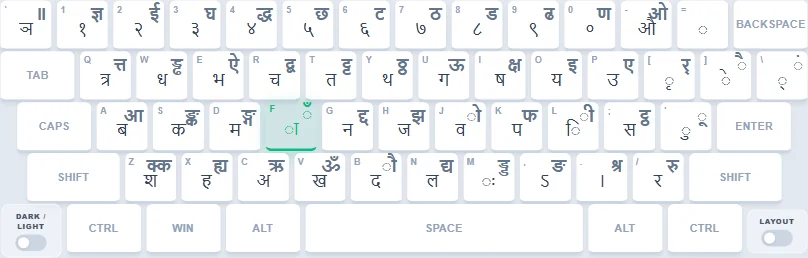
1. Traditional Unicode Nepali Typing Mode (The Professional Web Standard)
The Digital Revolution
While Preeti ruled the print world, the internet broke it — Preeti text on the web looks like gibberish unless the user has that specific font installed. This led to the adoption of Unicode, a universal standard where every character has a unique code that works on any device (iPhone, Android, Windows) without installing fonts. Traditional Unicode, also known as the Bakamataper layout, is designed to feel familiar if you already know Preeti, although some key positions and combinations differ: with a little practice, a Preeti typist adapts easily and keeps their speed while gaining text that works everywhere on the web.
Why Learn Traditional Unicode in 2026?
You might ask, "Why switch from Preeti to Unicode?" The answer is simple: reach. Unicode Nepali typing works across phones, browsers, and office software with a standard Nepali Unicode keyboard instead of a legacy font. Many modern offices, news portals, and digital archives use Unicode for searchable, shareable text; and your text stays readable by anyone, anywhere in the world.
How Our Unicode Mode Helps
Our platform recreates the professional Unicode newsroom and office desk. If you searched for Traditional Unicode Nepali typing lessons, this is where you practice:
- True Traditional Mapping: a position-based Unicode layout designed to feel familiar to legacy typists, although some key positions and combinations differ.
- Familiar Positions, Real Unicode: reuse much of your existing muscle memory while learning the differences, and get searchable text that works everywhere online.
- Copy Anywhere: draft posts, letters, and articles, then copy clean Unicode into any app.
- Timed Tests: passages with live WPM and accuracy tracking for timed practice.
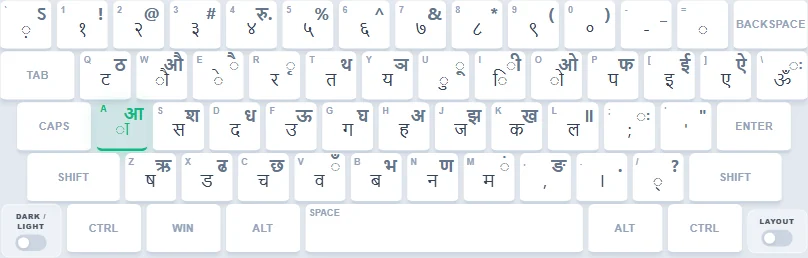
2. Romanized Nepali Typing Mode (Nepali Unicode Romanized for Everyone)
QWERTY-Friendly Typing for the New Generation
For Generation Z, the Nepali diaspora, and
anyone who grew up typing in English, learning the complex Preeti layout can feel
impossible. This mode uses a defined QWERTY-friendly mapping where English keys produce fixed Nepali characters (e.g.,
k → क · K → ख).
But note: it is not Roman-to-Nepali guessing — typing xa, x, cha or chha will not produce
छ. You press the key that sounds like it: Shift+C gives छ,
while plain c gives च. Type Nepali words with English letters and get correct
Nepali Unicode instantly. (Looking for pure Nepali Roman typing with direct Roman-script output? That is our upcoming
Roman Nepali typing mode — see Coming soon.)
Why Learn Romanized in 2026?
You might ask, "Why learn another layout when I already type in English?" The answer is simple: familiarity. Romanized uses QWERTY-friendly key associations that can feel natural from day one for everyday messages. For any coursework, office, NID, passport, or exam requirement, always check which keyboard layout the official notice specifies.
How Our Romanized Mode Helps
Our platform turns your everyday English keyboard into a Nepali chat machine. If you searched for Romanized Nepali typing lessons, this is where you practice:
- Fixed Romanized mapping: press k for क and K for ख — each key always produces its assigned Nepali character.
- Familiar QWERTY start: many keys share sound associations, but you still learn the defined mapping with practice.
- Chat-Ready Practice: short everyday sentences that mirror real messaging.
- Shift Smarts: uppercase keys unlock a second set of characters — like C for छ.
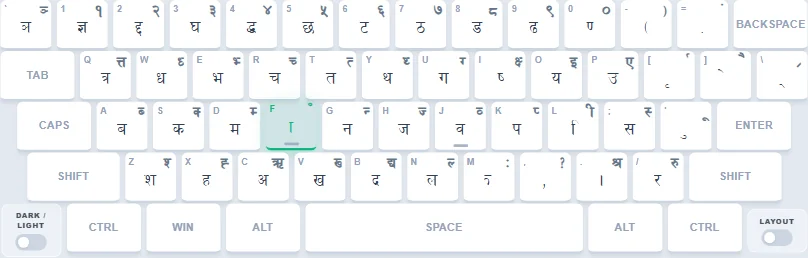
3. Preeti Typing Practice Mode (The Legacy Standard)
History & Significance
Preeti is not just a font; it is an institution. Developed in the early days of computing in Nepal, Preeti (along with Kantipur) became the standard for print media, newspapers, and official government documents. Because operating systems did not natively support Devanagari script back then, Preeti used a clever "hack"—it replaced standard English ASCII characters with Nepali glyphs. For example, typing 'a' would render 'ब' (ba) on the screen.
Why Learn Preeti in 2026?
You might ask, "Why use an old legacy system?" The answer is simple: Bureaucracy. Many older Nepali documents, templates and archives were created using Preeti and continue to be edited or reused today. Some Loksewa Ayog (Public Service Commission) aspirants still use Preeti, and you can use it in exams too — but so can you use Traditional Unicode or Romanized Unicode. Don't feel locked into Preeti: if you are already fluent in it or practicing it, keep going; if you are choosing fresh, the widely used Traditional Unicode — or Romanized, the favorite of new Gen-Z aspirants — is waiting for you.
How Our Preeti Mode Helps
Our platform offers timed typing practice designed to help you prepare for test-like conditions. If you searched for Nepali typing Preeti lessons, this is where you practice:
- True ASCII Mapping: We simulate the classic Preeti keyboard layout behavior perfectly, key by key.
- Complex Alt-Codes: Advanced characters like 'क्रमांक' require holding the Alt key. Learn and practise these codes — see the Preeti keyboard layout & Alt code cheat sheet.
- Exam Simulation: Our Nepali typing tests use exam-style passages for timed practice.
🚀 Essential Alt Codes for Office & Personal Use
| Character | Usage Example | Alt Code |
|---|---|---|
| ª | gª (Nang) | Alt + 0170 |
| Í | cÍ (Anka) | Alt + 0205 |
| Ø | Øfbj (Yadav) | Alt + 0216 |
| ¿ | ¿k (Ruup) | Alt + 0191 |
| Å | Åbo (Hridaya) | Alt + 0197 |
| ç | ç (Om) | Alt + 0231 |
| Û | slt /fd|f] Û (Kati Ramro !) | Alt + 0219 |
| Ì | cÌ (Anna) | Alt + 0204 |
| … | … (...) | Alt + 0133 |
| “ | “ (Quote) | Alt + 0147 |
| ´ | em08f (Jhanda) | Alt + 0180 |
| ˆ | cfˆgf] (Aafno) | Alt + 0136 |
| ˜ | lzjf]˜xd (Shivo˜ham) | Alt + 0152 |
|
* Pro Tip: Always use the numeric keypad (Numpad) on the right side when typing Alt codes. |
||
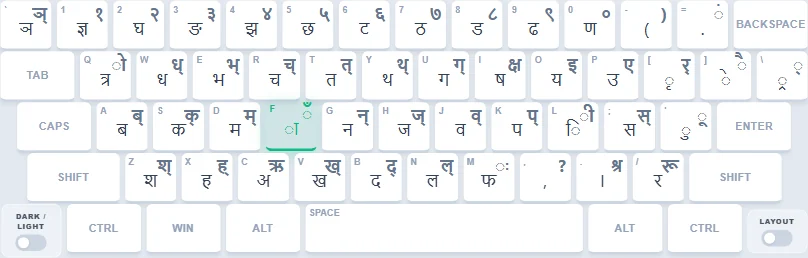
4. Standard Traditional Typing Mode
Position-Based, Not Sound-Based
Standard Traditional is a fixed-position Nepali Unicode keyboard layout with its own defined key positions. Unlike Romanized typing, you do not spell Nepali by English sound — characters sit at fixed positions: vowels grouped toward one side of the keyboard, consonants toward the other. Everything you type is clean Unicode Nepali that works on any device.
Why Learn Standard Traditional Typing in 2026?
You might ask, "Why learn a fixed layout when phonetic typing exists?" The answer is simple: foundation. Standard Traditional is an existing fixed-position Unicode layout. Practise it when your office, course or exam requires that exact keyboard; Windows and Linux installations can offer different Nepali layouts. Our lessons show targets that the current Standard practice layout can type. For missing characters, see our Unicode character and Word Alt+X guide.
How Our Standard Traditional Mode Helps
Our platform provides a guided Standard Traditional practice setup. If you searched for Standard Traditional Nepali typing lessons, this is where you practice:
- Defined Standard Mapping: every key in its defined Standard Traditional position, with an on-screen guide while you learn.
- Matra & Halant Focus: dedicated drills for vowel signs and half-letters where beginners lose speed.
- Timed Tests: passages with live WPM and accuracy tracking for timed practice.
5. English Typing Practice in Nepal (The Global Competence)
You may wonder why English typing is provided on the NepalType website, right? Because it is the base: almost every physical keyboard carries the English layout, so first set your hands on this — it is the basic need everything else builds on. Our standard QWERTY drills offer timed passages with live WPM and accuracy tracking, from home row to full passages — treat every session as an English typing test in Nepal.
Why Learn English Typing in 2026?
You might ask, "Why practice English on a Nepali typing website?" The answer is simple: foundation. Offices and computer operator tests vary by post and notice and often include English speed passages; practice timed English passages here and always check your specific test's speed and accuracy rules. The same daily practice routine transfers straight to Nepali modes.
How Our English Mode Helps
Our platform brings the exam hall to your desk. If you searched for English typing practice in Nepal, this is where you train:
- Structured QWERTY Drills: home row to full passages, step by step.
- Live Scoreboard: WPM and accuracy on every run, with errors highlighted for review.
- Perfect Base: active touch typing and finger placement here make you fluent in English and prepare you for faster typing across every Nepali mode.
Coming Soon: Roman Nepali Typing Mode
Upcoming feature — not live yet
We are building a dedicated Roman Nepali typing mode for writing Nepali directly in the Roman (Latin) script — natural Nepali Roman typing for chat, comments, and social media, with smart word suggestions. Until it launches, the closest live option is Romanized Nepali typing: type English letters and get Nepali Unicode (try Romanized mode).
6. Preeti to Unicode Converter (Free Nepali Typing Converter)
You don't need to learn every typing keyboard layout — master either Preeti or Unicode (we suggest Unicode for modern work). Type in your own style with our tools, then convert either way and use the text wherever needed: our free Nepali typing converter changes Preeti to Unicode for websites, email, and social media — and converts Unicode back to Preeti when an office or press still demands the classic font. No installation, no signup, unlimited conversions.
How to Use NepalType
Watch our complete guide to mastering the platform.
🔔 Subscribe for More Tips & Tutorials
Subscribe to YouTubeExpert Typing Insights
How to Use NepalType: The Complete Manual
Every mode, lesson, and practice tool explained step by step — start here before anything else.
Read Manual →What Is Preeti Font? A to Z Guide
Everything important in one place: what Preeti is, how it works, why it breaks online, and which Alt codes matter.
Read Full Guide →Preeti vs Unicode: Which One to Learn?
The key differences and why professionals still need both Preeti and Unicode.
Read Guide →Traditional Unicode Typing Guide
Learn the keyboard layout, matras, halant, and Unicode typing step by step.
Read Guide →Romanized Unicode Typing Guide
Type Nepali with English letters — key-mapping basics, matras, and speed tips.
Read Guide →Nepali Typing FAQ — Learn, Practice & Test (2026)
Q. Should I learn Preeti, Unicode, or Romanized typing?
You only need to master one layout — pick by exam or workplace requirement. Traditional Unicode and Romanized Unicode are the more modern choices: if you want phonetic typing, go for Romanized; if you want the traditional approach with modern text, go for Traditional Unicode.
Q. How can I type Nepali on my computer keyboard?
Wondering how to type Nepali on a computer keyboard without installing anything? You need nothing installed: open NepalType in your browser and type Nepali directly with your normal computer keyboard. Choose a Nepali keyboard typing layout (Preeti, Traditional Unicode, or Romanized), follow the on-screen key guide, and for serious speed connect any physical keyboard. See the full walkthrough in our user guide.
Q. Is Nepali typing really free on NepalType?
Yes, it's free. Every lesson, speed test, converter conversion, and leaderboard on NepalType costs nothing — no trial, no locked keys, no hidden charges.
Q. Where do I practice for Lok Sewa and computer operator typing exams?
Right here. Alongside practical lessons built around commonly used passages, you'll find timed Loksewa-type lessons for test-like practice — all training the speed and accuracy these tasks demand. Always check your exam notice for the required keyboard and rules.
Q. Can I practice Nepali typing on my Android or iPhone?
Yes — you can still learn Nepali typing from your phone. But for real progress, connect a physical keyboard via OTG or Bluetooth and practice with a physical keyboard for best progress.
Q. Does NepalType support Alt codes for complex Nepali characters?
Yes! Advanced typing tools are available too. We fully support complex Alt codes (e.g., Alt+0170 for 'ª') in our Preeti (प्रीति टाइपिङ) and Traditional modes, practice the Alt codes used in official documents; always proofread.
Q. Can I use NepalType to draft and copy long documents?
Yes — TypeZone is designed for exactly this. If you are still learning Nepali typing and want to write something in Nepali, use the on-screen keyboard, type it out, then copy it and use it at your workplace.